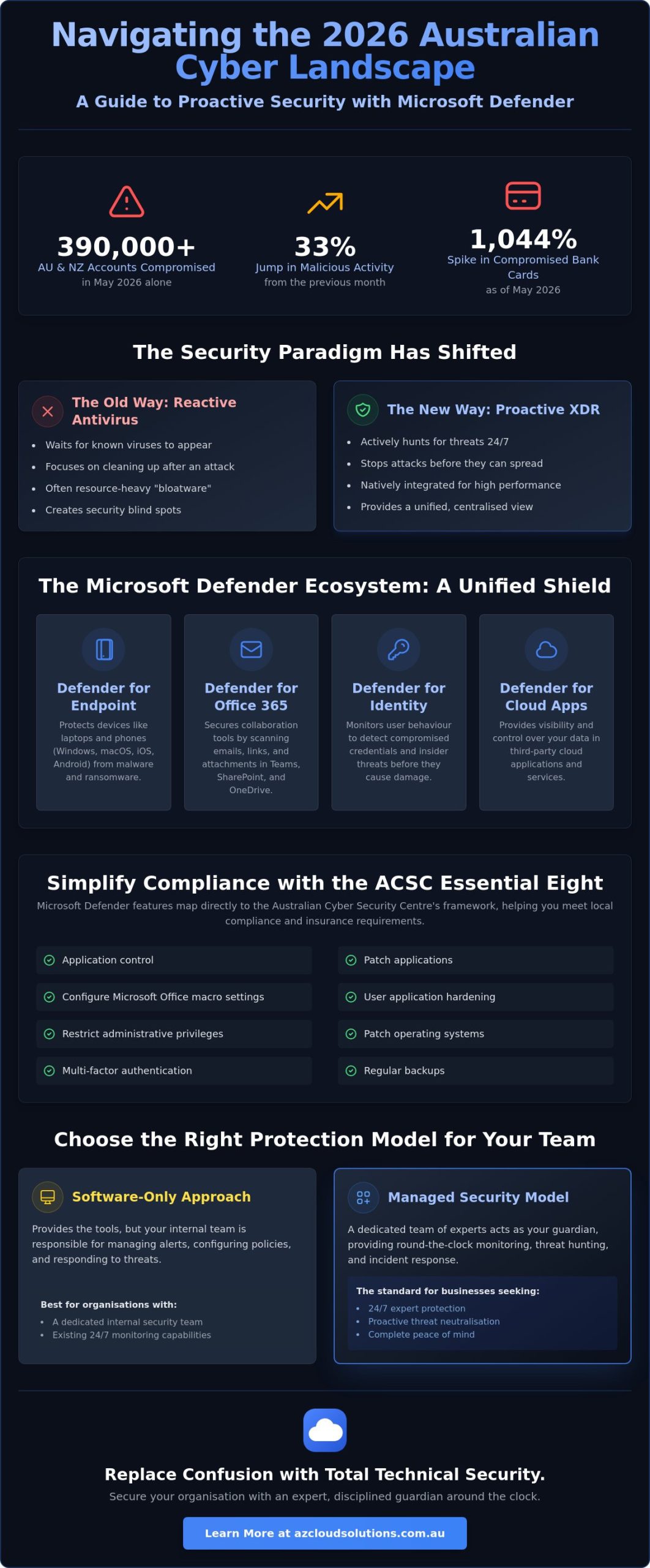
In May 2026 alone, over 390,000 Australian and New Zealand accounts were compromised, representing a staggering 33% jump in activity from the previous month. If you feel like the goalposts for cybersecurity keep moving, you aren’t alone. Most local business leaders are currently balancing the need to protect remote staff against sophisticated ransomware groups like CL0P while trying to understand exactly how microsoft defender fits into the ACSC Essential Eight framework. It is a lot of weight to carry when you simply want to focus on running your business.
This guide cuts through the technical noise to show you how to leverage the Microsoft Defender ecosystem as a centralised shield for your organisation. You will discover how to align your security posture with 2026 compliance standards, move through the Essential Eight maturity levels, and keep your data firmly on Australian soil. We provide a clear roadmap to achieving 24/7 visibility, giving you the confidence that your team is protected by a disciplined, expert guardian around the clock. By the end of this article, you will have a functional strategy to replace confusion with total technical security and peace of mind.
Key Takeaways
- Learn why shifting from reactive antivirus to a proactive threat hunting model is essential for surviving the 2026 Australian cyber landscape.
- Understand the four core pillars of the microsoft defender ecosystem and how automated disruption stops attacks before they can spread through your network.
- Identify the critical licensing thresholds between Business and Enterprise versions to ensure your security remains robust as your organisation scales.
- Discover how to map Defender features directly to the ACSC Essential Eight framework to simplify compliance and meet local insurance requirements.
- Compare the “software-only” approach against a managed security model to determine which path provides the 24/7 protection your team requires.
Understanding Microsoft Defender in the 2026 Australian Threat Landscape
Microsoft Defender has transformed from a simple antivirus into a comprehensive Extended Detection and Response (XDR) platform. It doesn’t just wait for a virus to appear. It proactively hunts for threats across your entire digital environment. In 2026, the security focus has shifted from reactive cleaning to active prevention. This is vital because Australian organisations are facing a 1,044% spike in compromised bank cards as of May 2026. Threat actors are no longer just sending obvious spam. They are using AI to craft sophisticated phishing attempts and harvest credentials from unsuspecting employees. By covering identity, endpoints, and cloud apps, the microsoft defender suite ensures your organisation has no blind spots.
The Evolution from Windows Security to Microsoft Defender
There is a significant difference between the free version on your home laptop and the tools required to run a business. Understanding the Microsoft Defender Antivirus history helps clarify how this tool moved from a basic scanner to a world-class security ecosystem. Defender for Business is now the modern standard for Australian SMBs seeking robust protection without the enterprise price tag. It provides a centralised dashboard that is essential for managing remote or hybrid teams. Instead of checking individual devices, your team can monitor every endpoint from one location. This ensures consistent policy enforcement across the whole company and stops threats before they can move laterally.
Why Australian Businesses are Prioritising Unified Security
Data breaches in Australia are becoming more expensive and more frequent. OAIC reports indicate that the time taken to identify and contain a breach directly correlates with the total financial loss. Moving to a unified microsoft defender setup reduces this window. Native security is a major advantage here. You avoid the “bloatware” often associated with third-party antivirus software that drains system resources and frustrates staff. This integration supports a Zero Trust architecture. It assumes every connection is a potential risk until proven otherwise. By verifying every user and device every time they access your data, you create a stable environment where security feels invisible rather than intrusive. This disciplined approach removes the friction of managing multiple vendors while significantly hardening your perimeter against modern cybercrime.
The Microsoft Defender Ecosystem: A Breakdown for Business
The microsoft defender ecosystem operates as a unified shield rather than a collection of disconnected tools. To understand its value, we must categorise the suite into its four primary pillars: Endpoint, Office 365, Identity, and Cloud. This structure provides the visibility required for modern endpoint management, ensuring that every device and user account is accounted for across your entire network. Visibility is the foundation of a secure posture. If you can’t see a device, you can’t protect it.
In 2026, the speed of cyber attacks requires an automated response. Automated attack disruption identifies suspicious patterns and instantly isolates compromised accounts or devices. This action stops lateral movement, preventing a single compromised laptop from becoming a network-wide disaster. AI and machine learning play a critical role here by identifying “zero-day” vulnerabilities. These are threats that have never been seen before. The system learns the “normal” behaviour of your environment and flags anything that deviates from that baseline. This protection extends across Windows, macOS, iOS, and Android, which is essential for Australian businesses managing a hybrid workforce.
Defender for Office 365: Securing Collaboration
Most breaches begin with a simple email or a shared file. Defender for Office 365 uses Safe Links and Safe Attachments to scan every interaction within Microsoft Teams, SharePoint, and OneDrive. If a staff member clicks a malicious link in a chat, the system blocks it in real-time. Anti-phishing policies use sentiment analysis to detect business email compromise (BEC). This technology flags messages that “feel” wrong, such as an urgent request for a bank transfer that doesn’t match a manager’s usual tone. Suspicious files are sent to “detonation chambers.” These are isolated virtual environments where the file is opened and tested for malicious activity before it ever reaches the user’s inbox.
Defender for Endpoint: Beyond Simple Antivirus
This pillar focuses on the health of your hardware. It includes vulnerability management, which automatically discovers unpatched software that could be exploited by hackers. Next-generation protection blocks malware by analysing file behaviour rather than just checking a list of known viruses. EDR (Endpoint Detection and Response) records every file movement and system change to provide a detailed trail for forensic analysis. Aligning these tools with the ACSC Essential Eight Framework is much simpler when your security is native to your operating system. If you want to ensure these tools are configured correctly for your specific needs, you might consider a managed security review to identify any gaps in your current setup.
Microsoft Defender for Business vs. Enterprise: Which Fits Your Organisation?
Choosing the right version of microsoft defender often comes down to two factors: your total headcount and your specific risk profile. For most Australian companies with fewer than 300 staff, Microsoft Defender for Business is the logical starting point. It provides enterprise-grade protection, including endpoint detection and response (EDR), but is simplified for smaller teams to manage. Once you exceed that 300-seat threshold, you must transition to Enterprise licensing, such as Defender for Endpoint Plan 2. This shift isn’t just about seat count; it’s about gaining access to deeper forensic tools and more granular control over your security environment.
A standout feature in higher-tier plans is “automated investigation and remediation.” This technology doesn’t just alert you to a problem. It actually starts the cleanup process by investigating the alert, determining the root cause, and taking action to neutralise the threat. This is a game-changer for businesses without a massive internal security team. From a compliance perspective, your choice of license directly impacts your ability to meet cyber insurance requirements. Many Australian insurers now require evidence of active EDR and automated response capabilities before they will issue or renew a policy. Having the correct license ensures you don’t just have the software, but the specific features required to remain insurable.
Licensing Logic for Australian SMBs
For the majority of local SMBs, Microsoft 365 Business Premium is the most efficient choice. It bundles the full microsoft defender for Business suite with other essential tools like Intune for device management. If your organisation currently uses Business Standard, you can add Defender as a standalone subscription, but the bundle usually offers better value and tighter integration. When deciding, look beyond your current staff numbers. Consider your risk profile. If you operate in a high-target sector like healthcare or finance, the advanced hunting and cross-platform capabilities of Enterprise-tier licenses may be necessary regardless of your size.
Advanced Features: When do you need Defender for Identity?
Identity is the new perimeter in a hybrid work world. While endpoint protection secures the device, Defender for Identity monitors signals from your on-premises and cloud environments to spot compromised credentials. It is specifically designed to detect complex attacks like “pass-the-hash,” where a hacker steals a password hash to move through your network without ever knowing the actual password. If your team works across various locations or you still maintain local servers alongside cloud apps, this layer of protection is vital. It provides the “disciplined guardian” role for your user accounts, ensuring that even if a device is safe, the person logging in is who they claim to be.
Aligning Microsoft Defender with the ACSC Essential Eight Framework
The Australian Cyber Security Centre (ACSC) developed the Essential Eight as a prioritised list of mitigation strategies to protect organisations. It is the baseline for cyber resilience in Australia. While many global security tools struggle to map to these local requirements, microsoft defender provides a direct path to compliance. For example, the “Patch Applications” and “Patch Operating Systems” requirements are handled through the platform’s vulnerability management module. It identifies outdated software across your fleet and prioritises fixes based on the actual risk to your business. This turns a complex administrative task into a streamlined, data-driven process.
Restricting administrative privileges is another core pillar where the suite excels. Defender for Endpoint monitors for suspicious account activity and flags when standard users are attempting to perform high-level system changes. This visibility is vital for stopping credential theft. For “User Application Hardening,” the combination of Microsoft Purview and microsoft defender allows you to block dangerous file types, such as untrusted Office macros or malicious browser extensions. These layers of protection ensure that even if a staff member makes a mistake, the system prevents the threat from executing. Continuous monitoring is also built into the core of the platform. It provides the detailed logs and real-time alerts required to meet the audit standards of the ACSC Essential Eight Framework.
Achieving Maturity Level 1 and Beyond
Reaching Maturity Level 1 requires more than just installing software. You need a disciplined configuration that includes:
- Enabling Attack Surface Reduction (ASR) rules to block common malware entry points.
- Integrating Defender with Microsoft Intune to enforce application control policies.
- Configuring automated investigation and remediation to handle low-level alerts.
Standard configurations rarely pass a formal audit because they lack the specific enforcement settings required for higher maturity levels. The synergy between Defender and Intune is what allows you to move from simply having security to actively enforcing it across every device in your network.
The Role of Managed Services in Compliance
The biggest risk to your security posture is a “set and forget” mindset. Cyber threats evolve too quickly for static configurations to remain effective. Maintaining Essential Eight compliance requires regular reporting, posture assessments, and constant tuning of your alert thresholds. You need evidence of your security status to satisfy board members and cyber insurers. AZ Cloud Solutions streamlines this compliance journey by providing the disciplined oversight and technical expertise needed to maintain your maturity level. If you are ready to secure your environment, you can book a security consultation to evaluate your current Essential Eight alignment.
Why Managed Microsoft Defender is the Standard for Proactive Protection
Owning a license for microsoft defender is only the first step toward a secure organisation. The real value lies in how that tool is monitored, tuned, and maintained. A “software-only” approach often leads to alert fatigue, where critical warnings are buried under a mountain of low-level notifications. In contrast, a managed security service provides a disciplined, human layer of oversight. It ensures that when a high-risk alert triggers at 2:00 AM on a Saturday, there is a professional ready to respond. This 24/7 helpdesk capability transforms a reactive tool into a proactive shield, stopping threats before they can cause damage.
We operate with a “Safe Pair of Hands” philosophy. This means we take full ownership of your security environment, handling the complex heavy lifting behind the scenes so you don’t have to. Proactive monitoring allows us to identify and resolve vulnerabilities before they are exploited by threat actors. By preventing downtime before it occurs, we ensure your business remains stable and your team stays productive. It’s about moving from a state of constant technical anxiety to one of total security and support. You gain the peace of mind that comes from knowing a vigilant partner is watching over your digital assets around the clock.
The AZ Cloud Solutions Approach to Defender
Our team focuses exclusively on Microsoft 365 and Azure environments. This specialisation allows us to configure, monitor, and optimise the microsoft defender suite with extreme precision for the Australian market. We don’t just install the software and walk away. We build custom endpoint management workflows and proactive patching schedules that align with your specific risk profile. This systematic approach ensures your devices are always up to date and your security policies are strictly enforced. We handle the technical discipline required for modern compliance, ensuring your environment is always audit-ready.
Next Steps: Securing Your Digital Assets
The transition to a managed security model starts with a comprehensive security audit. This process identifies hidden gaps in your current Microsoft 365 setup and provides a clear roadmap for hardening your defences. Once we understand your environment, we move through a logical progression to implement the necessary controls. This includes aligning your settings with the ACSC Essential Eight and establishing 24/7 monitoring protocols. If you’re ready to secure your organisation against modern threats while meeting local compliance standards, you can organise a security consultation with AZ Cloud Solutions today. We will help you achieve a state of technical stability with a partner you can trust.
Future-Proof Your Security Posture
The 2026 threat landscape in Australia requires a transition from basic protection to a disciplined, unified security posture. Successfully leveraging microsoft defender involves more than just selecting the right license. It requires a precise configuration that aligns with the ACSC Essential Eight framework to ensure your organisation remains resilient and insurable. By centralising your defences within this ecosystem, you remove unnecessary technical friction and gain total visibility over your digital environment.
AZ Cloud Solutions acts as your expert guardian, providing the steady hand needed to manage these complex systems. As Microsoft 365 and Azure specialists, we offer 24/7 proactive monitoring and a dedicated helpdesk to handle the heavy lifting behind the scenes. Our team focuses on Essential Eight alignment to ensure your compliance journey is smooth and verifiable. Secure your business with Managed Microsoft Defender to replace technical uncertainty with professional confidence. We are ready to help you build a stable, secure foundation for your organisation’s continued growth.
Frequently Asked Questions
Is Microsoft Defender better than third-party antivirus like Norton or McAfee?
Microsoft Defender is often the superior choice for businesses because it’s built directly into the operating system. This native integration ensures high performance without the “bloatware” that can slow down staff devices. It also provides a unified security posture, allowing you to manage identity, endpoints, and cloud apps from a single dashboard rather than juggling multiple third-party agents.
Does my Australian business need Microsoft Defender for Business or Enterprise?
The choice generally depends on your seat count and risk profile. Organisations with fewer than 300 staff are usually best served by Microsoft Defender for Business, which offers enterprise-grade protection simplified for smaller teams. If your organisation exceeds 300 users or requires advanced forensic tools for high-risk sectors, moving to an Enterprise-tier license is the professional standard.
How does Microsoft Defender help with Essential Eight compliance?
The platform maps directly to several Essential Eight strategies, including patch management and application control. It identifies unpatched software across your fleet and provides the enforcement tools needed to restrict administrative privileges. This visibility makes it much simpler to provide the evidence of compliance required by local cyber insurers and government auditors.
Can Microsoft Defender protect my Macs and mobile devices too?
Yes, the suite provides comprehensive cross-platform protection for macOS, iOS, and Android. You can manage security policies for your entire mobile fleet from the same central dashboard used for your Windows PCs. This ensures that your security standards remain consistent across the whole organisation, regardless of the hardware your team uses to stay productive.
What is the difference between the free Windows Defender and Microsoft Defender?
Windows Defender is a consumer-grade antivirus designed for basic home protection. In contrast, microsoft defender for Business is a commercial-grade XDR platform that includes endpoint detection and response (EDR). The business version provides centralised management, automated investigation, and the ability to remediate threats across your entire network simultaneously.
Is Microsoft Defender included in my Microsoft 365 subscription?
It is included in several common business plans, most notably Microsoft 365 Business Premium and the Enterprise E3 and E5 tiers. If your organisation currently uses Business Standard, you can add the security features as a standalone subscription. Reviewing your current licensing ensures you aren’t paying for redundant third-party tools when you already have access to high-tier protection.
Do I need a managed service provider to run Microsoft Defender?
While the software is powerful, a managed service provider ensures it’s actually monitored and tuned correctly. Most businesses don’t have the internal resources to respond to security alerts 24/7. A partner takes ownership of the environment, preventing alert fatigue and ensuring that a disciplined expert is always available to handle the heavy lifting behind the scenes.
What happens when Microsoft Defender detects a threat?
The system triggers automated disruption to instantly isolate the compromised device or user account. This action stops the threat from moving laterally through your network and causing further damage. After containment, the platform provides a detailed forensic report, allowing your security team to understand the root cause and harden your defences against similar future attacks.