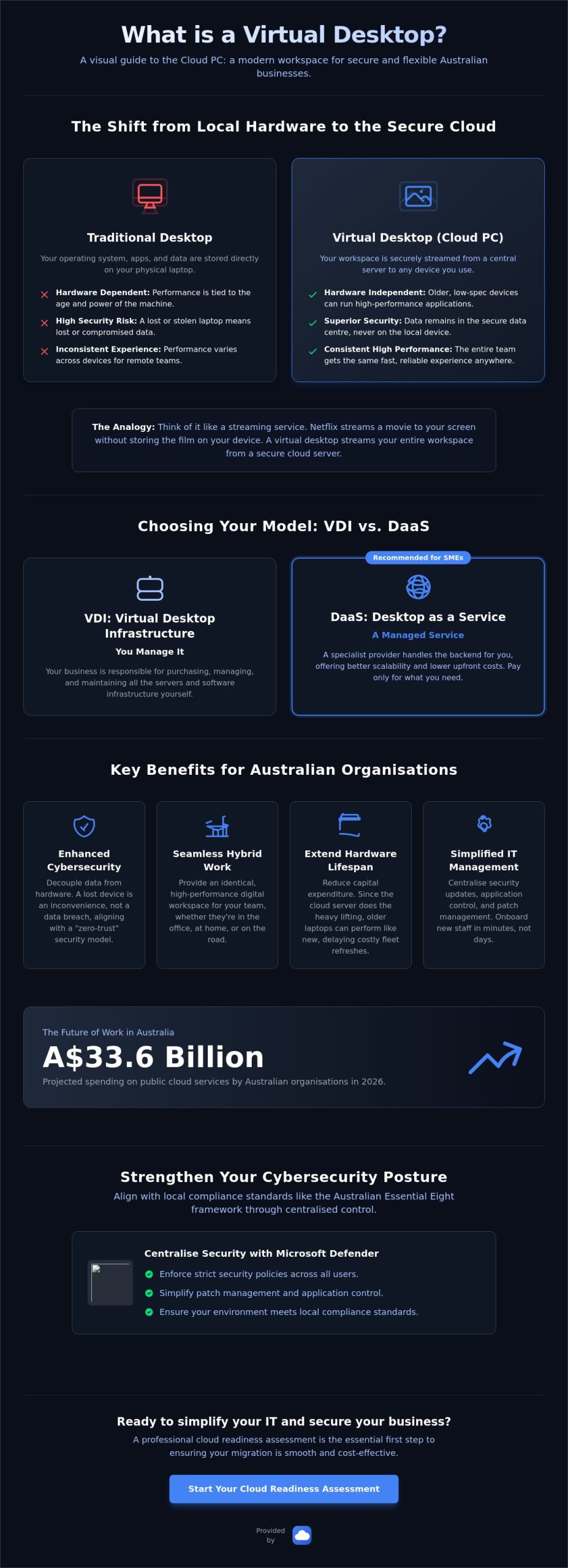
With Australian organisations projected to spend over A$33.6 billion on public cloud services in 2026, the traditional office server room is rapidly becoming a relic of the past. You’ve likely felt the frustration of refreshing an entire fleet of expensive laptops only to deal with inconsistent software performance across your remote team. You’re probably asking, what is a virtual desktop, and whether it’s a genuine solution for your business or just another technical buzzword that adds unnecessary complexity.
It’s understandable to feel a sense of anxiety regarding data security when your staff work from various locations on different devices. We agree that managing a fragmented IT environment is a source of constant friction. This guide will show you how virtual desktops work to centralise your operations and remove the heavy lifting of hardware management. We’ll compare VDI and DaaS, explain why cloud desktops provide superior security, and provide a clear roadmap to simplifying your IT infrastructure for the year ahead.
Key Takeaways
- Understand the core concept of what is a virtual desktop by using the “streaming service” analogy to simplify complex cloud infrastructure.
- Discover how centralising your data in a secure Australian centre protects your business from the risks associated with lost or stolen physical hardware.
- Learn how to provide a consistent, high-performance workspace for your team regardless of their location or the device they are using.
- Identify why a professional cloud readiness assessment is the essential first step to ensuring your migration is smooth and cost-effective.
- Gain a clear path toward reducing IT headaches by decoupling your critical business applications from aging physical laptops.
What is a Virtual Desktop? Defining the “Cloud PC”
To understand what is a virtual desktop, think of it as a digital workspace that exists independently of your physical hardware. Traditionally, your files, applications, and operating system are stored directly on your laptop’s hard drive. If that hardware fails or is stolen, your data goes with it. A virtual desktop moves that entire environment onto a secure, centralised server, allowing you to access your work from any location.
It works much like a modern streaming service. Just as Netflix streams a movie to your tablet without the film being physically stored on the device, a virtual desktop streams your entire workspace to your screen. You see your icons, open your spreadsheets, and run your software as usual, but the actual “engine room” is running in a high-security data centre. When asking what is a virtual desktop in a commercial context, the answer usually leads to Azure Virtual Desktop. This has become the industry standard for Australian organisations because it integrates perfectly with the Microsoft 365 tools your team already uses every day.
It is important to distinguish this from the “Virtual Desktop” apps found in VR gaming stores. While those apps create a 3D environment for headsets, business-grade virtual desktops are built for productivity, security, and remote collaboration.
How it differs from a traditional desktop
In a traditional setup, your laptop performs “local processing”. The speed of your work depends entirely on the power of the machine in front of you. If the laptop is five years old, your software will lag. With a cloud setup, the processing happens on a powerful remote server. Your physical device becomes a “thin client”. It acts as a high-resolution window into a much more capable machine. This means even an older laptop or a basic tablet can perform like a high-end workstation because the server handles the heavy lifting.
The difference between VDI and DaaS
You will often hear the terms VDI and DaaS used together, but they serve different needs. Virtual Desktop Infrastructure (VDI) usually refers to an environment where your business manages the servers and software yourself. Desktop as a Service (DaaS) is a managed model where a specialist provider handles the backend infrastructure for you. Most Australian SMEs prefer the DaaS model. It offers better scalability and lower upfront costs, allowing you to pay only for the seats you need while ensuring your environment stays updated and secure.
Key Benefits: Why Australian Businesses are Making the Switch
Moving beyond the technical definition of what is a virtual desktop, we need to look at why local organisations are prioritising this shift. The primary driver is the decoupling of data from physical hardware. If a staff member leaves their laptop on public transport or in a cafe, the risk to your business is significantly reduced. Because the data never actually sits on the device’s hard drive, it remains protected within the secure data centre. Leading virtual desktop providers emphasise this “zero-trust” approach as a cornerstone of modern business resilience.
This model also solves the “hybrid work” headache. Whether your team is at a home office or a remote site, their digital experience remains identical. They log in and see the same icons, files, and applications they had in the office. This consistency extends the life of your hardware too. You don’t need to buy a fleet of expensive laptops every few years to keep up with software demands. Since the cloud server does the processing, even an older machine can run high-performance applications without lag.
Boosting your cybersecurity posture
Virtual desktops allow you to create a “hardened” environment that is much easier to defend. When considering what is a virtual desktop for your team, the ability to centralise security updates is often the deciding factor. By integrating with Microsoft Defender, you can enforce strict security policies across every user at once. This setup is particularly effective for Australian businesses aiming to align with the Essential Eight framework. It simplifies patch management and application control, ensuring your environment meets local compliance standards without manual intervention on every single laptop.
Reliability and business continuity
Cloud desktops offer an “always-on” availability that physical machines can’t match. If a local computer fails, your staff member simply grabs another device, logs in, and continues exactly where they left off. This level of stability is best achieved through managed Microsoft 365, which ensures your entire suite of productivity tools remains synchronised and secure. When you hire someone new, you can provision a pre-configured desktop in minutes, removing the traditional delay of shipping and setting up new hardware. If you’re ready to see how this fits your specific needs, we can help you optimise your cloud infrastructure for long-term growth.
Implementation: Moving Your Team to a Virtual Environment
Transitioning to a cloud-based workspace requires more than just a software subscription. A successful rollout begins with a professional Cloud Readiness assessment to evaluate your current bandwidth and application compatibility. This step ensures that when you ask what is a virtual desktop experience like for your staff, the answer is “seamless.” We focus on selecting the correct Azure instance size to ensure performance is snappy and reliable. Desktop virtualization should never feel like a compromise; it should feel like an upgrade.
Integration is the next priority. Your virtual environment must work perfectly with existing tools like Microsoft Teams and SharePoint. When these systems are correctly aligned, your team can collaborate on files and hold video meetings without the latency issues often found in poorly configured setups. This creates a unified digital workspace that looks and feels like a standard Windows PC but offers the power of the cloud.
The role of a Managed Service Provider (MSP)
Setting up the environment is only half the battle. High availability requires proactive monitoring and helpdesk support to resolve minor hitches before they disrupt your day. AZ Cloud Solutions acts as your expert guardian, handling the heavy lifting under the bonnet. We take full ownership of the backend infrastructure, including security patches and performance optimisations. This allows you to focus on your core business while we ensure your IT environment remains stable and secure.
Next steps for your organisation
- Launch a pilot program for a small team to experience the performance gains first-hand.
- Review your current hardware refresh cycle to identify where virtual desktops can replace expensive laptop upgrades.
- Consult with a specialist to map out a migration timeline that avoids operational downtime.
Understanding what is a virtual desktop is the first step toward a more agile business. By decoupling your data from aging physical devices, you reduce capital expenditure and increase your long-term security posture. This systematic approach ensures your transition to the cloud is disciplined, efficient, and free of technical friction.
Future-Proof Your Business with Cloud Infrastructure
Adopting a modern workspace is no longer a luxury for growing organisations. We have moved beyond the basic definition of what is a virtual desktop to show how this technology removes the friction of physical hardware management. By centralising your data and applications, you gain a level of security and performance that traditional local setups cannot match. It is a strategic shift toward a more stable, scalable business model that protects your intellectual property while empowering your remote team.
As Microsoft Azure specialised partners, we handle the heavy lifting of migration and ongoing maintenance. Our Australian-owned and operated team provides 24/7 proactive monitoring and helpdesk support, ensuring your environment stays optimised and your staff stay productive. We take full accountability for your technical stability so you can focus on your core objectives without the distraction of IT failures. Secure your business with a managed Azure Virtual Desktop solution from AZ Cloud Solutions. We look forward to helping you build a more resilient foundation for your team’s future.
Frequently Asked Questions
Is a virtual desktop the same as a VPN?
No, they serve different functions within your IT environment. A VPN creates a secure tunnel between your local device and the office network to allow file access. A virtual desktop is a complete digital workspace hosted on a secure server. When you log in, you aren’t just accessing files; you’re running your entire operating system and all business applications within the cloud environment.
Will my staff experience lag when using a virtual desktop in Australia?
Performance is generally snappy and responsive provided your environment is hosted in Australian data centres. By utilising Azure regions in Sydney or Melbourne, we keep latency to a minimum for local teams. Most staff find the experience indistinguishable from a local machine when using a standard NBN or 5G connection. We focus on correct instance sizing to ensure your software runs smoothly even during resource-heavy tasks.
Do I still need to buy Microsoft 365 licences for virtual desktops?
Yes, valid licensing is still required to run your productivity suite. However, many Australian organisations already possess the necessary rights through their existing Microsoft 365 Business Premium or Enterprise subscriptions. This often allows you to deploy the technology without purchasing additional software seats. It’s a vital component of understanding what is a virtual desktop strategy for reducing overall capital expenditure on software.
What happens if the internet goes down while I am using a virtual desktop?
Your session remains active on the remote server even if your local connection drops. Because the processing doesn’t happen on your laptop, your open documents and unsaved work are not lost. You simply reconnect once your internet service is restored and resume exactly where you left off. This provides a significant advantage over traditional setups where a local crash or power failure could result in lost data.